Language Switch

Language Switch

Language switch

This question type allows the user to change the language of the survey. Users can choose the language they want to have the survey questions displayed in from a dropdown list.


The dropdown list includes the base language (which is selected when the survey is created for the first time) and the additional ones  The language can be changed from the general settings panel.
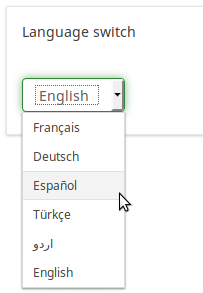
Language switch question type.png

    • Related Articles

    • Date/Time

      Overview The Date/Time question type enables survey participants to provide date, time, or combined date/time responses. Key Features Participants may select values through either a popup calendar or dropdown boxes. Survey administrators can ...
    • List with Comment

      List with Comment This question type presents radio button options and enables survey respondents to submit a comment alongside their selection. Related Articles List (Dropdown) — A question format that gathers responses via dropdown selection, with ...
    • List (Radio)

      List (Radio) This question type collects input from a list of radio buttons. The List image select (Radio) question type variant works the same way, but presents each answer option as an image instead of text. Related Articles List with Comment — ...
    • Special question types: where classic "mask questions" live now

      In classic LimeSurvey documentation, "mask questions" was a catch-all category for question types where the input of answers is predefined — things like Yes/No, Gender, Date/time, Numerical input, Equation, and File upload. The LimeSurvey 7 question ...
    • Numerical Input

      Numerical Input This question type allows survey respondents to enter a single number into a text field. Related Articles Multiple Numerical Input — An extension of the numerical input question type that "allows multiple text boxes to be created, ...